Browser Use — agent-browser 接入 MCP 链路方案
Browser Use
请求时序
sequenceDiagram
    participant U as 用户
    participant A as 外部Agent
    participant G as MCP Gateway
    participant S as Session / Connection Store
    participant M as Session Manager
    participant C as 容器 / Sandbox 中的 MCP Server
    participant P as 第三方平台

    U->>A: 请求使用某第三方能力
    A->>G: tool_call(user_id 或 connection_id, tool_name, args)

    G->>S: 查找 user_id 是否已有 ACTIVE connection

    alt 已有连接
        S-->>G: 返回 ACTIVE connection
    else 无连接
        S-->>G: 未找到 ACTIVE connection
        G->>S: 创建 INITIATED connection
        S-->>G: connection_id
        G-->>A: 返回 needs_connection + authorize_url + connection_id
        A-->>U: 请先完成授权
        U->>P: 打开 authorize_url 并完成授权
        P-->>G: callback(code,state)
        G->>S: 校验 state + 读取 pending connection
        G->>P: code 换 token / 拉用户主体信息
        P-->>G: access_token / refresh_token / provider_subject
        G->>S: 激活 connection,保存 token / cookies / subject
        S-->>G: ACTIVE connection
        A->>G: 再次发起 tool_call(connection_id, tool_name, args)
    end

    G->>M: Lookup session(connection_id, provider_key)

    alt 已有可复用 session
        M->>S: 读取 session 绑定(container_id, session_id, access_time)
        S-->>M: 返回已绑定 session
        M->>S: 更新 last_access_time / lease_expire_at
    else 无可复用 session
        M->>M: Provision 新容器 / sandbox
        M->>S: 持久化 session 绑定(container_id, session_id, connection_id)
        S-->>M: 返回新建 session
    end

    M-->>G: 返回可用 session + container endpoint
    G->>C: Forward /mcp request(connection_id, session_id, tool_name, args)

    alt provider 需要 OAuth / cookie / browser auth state
        C->>S: 读取 connection token / cookies / browser auth state
        S-->>C: 返回授权上下文
    end

    C->>P: 调用第三方业务 API / 打开目标页面
    P-->>C: 返回业务结果 / 页面结果
    C-->>G: MCP 响应
    G->>S: 更新 connection.last_used_at / session.last_access_time
    G-->>A: 返回结果

    opt session 空闲超时或容器异常
        M->>S: 标记 session 为 EXPIRED / RECYCLED / BROKEN
        M->>M: 回收 container / sandbox
    end

    opt 第三方返回 token_expired / unauthorized
        C-->>G: 返回认证失效错误
        G->>S: 检查 connection 是否可 refresh
        alt 可 refresh
            G->>P: refresh token
            P-->>G: 新 token
            G->>S: 原子更新 connection token
            G->>C: 使用同一 session 或新 session 重试一次
            C-->>G: 重试结果
            G-->>A: 返回最终结果
        else 不可 refresh
            G->>S: 标记 connection 为 EXPIRED
            G-->>A: 返回 needs_reconnect
        end
    end
文章总结
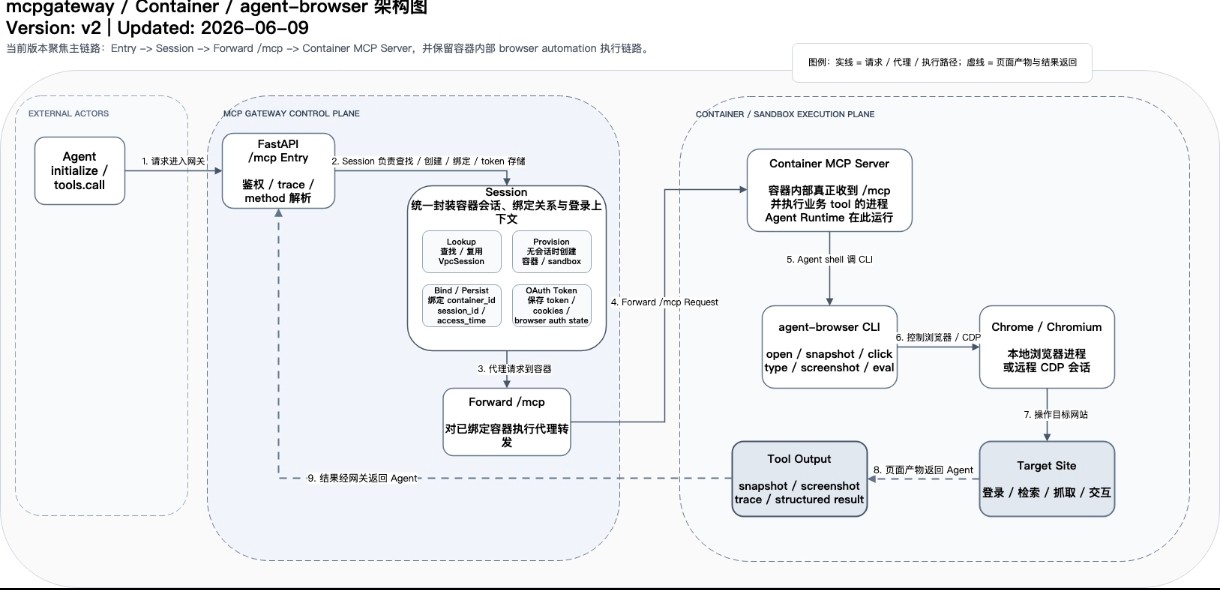
这篇文章是在设计一条把 agent-browser 接入 Agent / MCP 链路的技术方案,目标是让 Agent 不只依赖传统 web-fetch,而是能在 sandbox 容器里通过真实浏览器完成页面访问、登录态复用、点击、输入、截图、结构化抓取等任务。
核心架构分成三层:
MCP Gateway控制面:负责 OAuth 连接管理、session 路由、容器分配、请求转发,以及 token / cookies / browser auth state 的保存。container / sandbox执行面:真正运行 MCP Server 和 Agent Runtime,并通过agent-browser CLI操作 Chrome / Chromium。third-party platform / target site:目标网站或第三方平台,提供登录、授权、业务页面和数据。
落地路径主要有三步:先在 sandbox 镜像里安装 agent-browser,再开通必要的互联网访问白名单,最后在 Agent 链路中增加对应 skill,用 CLI 模式访问浏览器。
文章还定义了 browser-use 的最小可用能力。P0 能力包括 prepare、navigate、snapshot、click,构成浏览器自动化的最小闭环;P1 能力包括 fill、evaluate、status、tab、screenshot,用于补全表单输入、页面脚本执行、诊断、多标签页和验收调试。
Benchmark 计划是比较 PageVisit 基线 和 BrowserUse 方案 在 BrowseComp-ZH 等任务上的 Pass@1 / Pass@3 效果。文章列出的典型 case 重点覆盖传统搜索或 web-fetch 难处理的场景,比如小红书等封闭信息源、车票库存、知乎登录态、 GitHub 评论整理、网站目录抓取、旅游比价、多平台行程规划、航司规则查询等。
一句话概括:这篇文章是在把「可真实操作网页的浏览器能力」做成 MCP 可调用的基础设施,让 Agent 从”读网页”升级到”能登录、能点击、能抓取、能验证结果”的浏览器执行系统。