Code Agent — 自进化代码编辑方案
Code Agent
目的
实现基本代码读写能力,对 Agent 源码进行编辑。
自进化 Skill 定义
Skill 构建和读取代码上下文及轨迹上下文,实现对 Agent 的从 0 生成和优化:
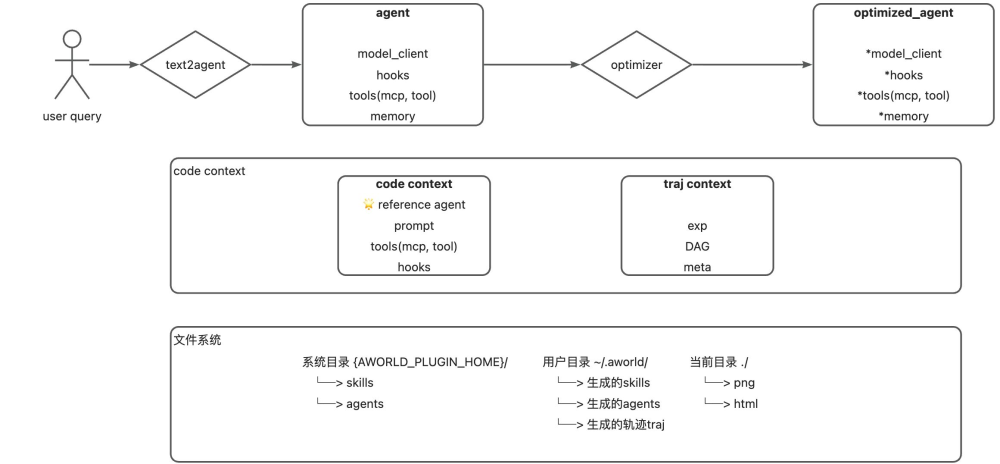
Code 编辑方案
Code Assistant(CAST) — 基于 Tree-sitter 的统一代码助手框架,专为 Agent 代码理解与优化设计,采用三层分层索引架构,为 LLM 提供精确的代码理解与修改能力。
1 | ┌─────────────────────────────────────────────────────────┐ |
Tools 集成
作为 CAST 框架与 Agent 生态的集成桥梁:
| Tool | Description | Integration Interface |
|---|---|---|
| cast_analysis_tool.py | Code analysis and structure extraction | ANALYZE_REPOSITORY, SEARCH_AST |
| cast_search_tool.py | Search functionality tools | GREP_SEARCH, GLOB_SEARCH, READ_FILE |
| cast_coder_tool.py | Code modification and deployment tools | GENERATE_SNAPSHOT, DEPLOY_PATCHES, DEPLOY_OPS, SEARCH_REPLACE |
工作流集成
三层架构支持渐进式细化工作流:
1 | 1. 预处理阶段 |
该工作流确保 Optimizer Agent 仅在需要修改的特定区域消耗详细代码(L3),在保持全面理解的同时大幅提升效率。
Analyzer — 三层分层索引架构
CAST 框架采用「动态全景 - 静态骨架 - 按需源码」三层架构,将代码从静态文本转换为动态可导航的图结构,实现高效的渐进式代码理解与优化。
接口设计
- Parser factory functions:自动语言检测
- Abstract analyzer interface:PageRank 重要性计算
Parser Layer(ast_parsers/) — 基于 Tree-sitter 的统一解析架构:
1 | BaseParser (Abstract Base Class) |
Analyzer Layer(analyzers/)
- PageRank Weighting:基于调用关系的符号重要性计算
- Multi-dimensional Matching:四维相关性评分(content, signature, documentation, name)
- Incremental Caching:SQLite 持久化,支持跨 session 使用
- Smart Filtering:自动排除缓存文件、构建产物等
设计理念:从静态文本到动态图
传统方法将代码视为:
- 静态文本:直接注入上下文,导致 token 溢出和注意力分散
- 碎片化片段:基于 RAG 检索,丢失结构逻辑关系
CAST 采用基于图的方法:
- 静态结构:使用 Tree-sitter 提取 AST(抽象语法树)
- 动态关系:构建调用图,计算 PageRank 重要性
- 执行感知:基于轨迹的动态剪枝和热力图生成
L1 — 全景逻辑层(LogicLayer)
功能:提供全局高层代码架构视图,快速理解组件组成和执行模式。
核心组件:
1 | class LogicLayer: |
核心特性:
- 项目结构可视化:展示完整目录树和模块关系
- 关键符号表:列出核心类和方法(如 AgentCore、MemoryManager、ToolExecutor)
- 动态执行热力图:基于执行轨迹高亮实际执行的文件和函数
- 调用关系图:展示模块交互(如
AgentCore.run()调用ToolExecutor.execute()) - 轨迹剪枝:自动隐藏未执行文件,大幅减少上下文大小
输出示例:
1 | [项目结构 & 执行路径] |
应用场景:大型代码库快速架构理解、核心模块识别、依赖分析、问题定位。
L2 — 接口骨架层(SkeletonLayer)
功能:提供接口级概览(不含实现细节),支持精确代码定位和 API 理解。
核心组件:
1 | class SkeletonLayer: |
技术实现:
- AST 提取:使用 Tree-sitter 或 Python ast 模块解析源码
- 签名保留:保留所有 import、class 定义和 def 声明
- 文档保留:保留所有 docstring(理解设计意图的关键)
- 实现移除:函数体替换为
pass或...,或仅保留前 5 行 - 行号标注:标记每行的原始行号(如
(Line 105))
输出示例:
1 | # File: planner.py |
核心特性:完整 API 概览、设计意图保留、精确位置映射、token 消耗仅为原代码的 5–10%。
应用场景:接口级代码理解、函数签名快速识别、设计模式分析、问题精确定位。
L3 — 源码实现层(ImplementationLayer)
功能:提供完整源码实现,支持精确代码定位和精准修改。
核心组件:
1 | class ImplementationLayer: |
访问模式:Optimizer Agent 通过工具调用按需访问 L3:
1 | # Agent 在 L1/L2 中定位问题,然后请求特定代码 |
核心特性:完整源码、精确符号位置、引用关系分析、支持精准代码替换。
应用场景:问题定位后的精确修改、特定函数实现检查、代码重构优化、最小上下文开销的 bug 修复。
基于轨迹的优化(未实现)
CAST 的关键创新是将执行轨迹数据集成到上下文展示优化中。
轨迹映射
CAST 将轨迹解析并映射到代码结构:
- 解析轨迹:提取堆栈跟踪、执行函数调用和错误位置
- 映射到代码结构:将轨迹事件关联到 L1/L2 中的具体代码位置
- 可视化标注:直接在代码结构上标记问题区域(如
[ERROR: Timeout]标注在 tools.py 旁)
效果:Optimizer Agent 无需阅读数千行日志即可立即看到问题位置。
动态剪枝
当 Agent 有 100 个文件但仅执行了 3 个时:
- 执行分析:识别实际调用的文件/函数
- 上下文剪枝:在 L1/L2 中隐藏或折叠未使用文件
- Token 减少:上下文长度减少 70–90%
- 聚焦增强:Optimizer Agent 专注于「案发现场」代码路径
Searcher — 代码读取
Search Engine Layer(searchers/) — 与文件系统的 cat、grep 等读文件命令逻辑一致:
| 类型 | 功能描述 | 实现类 |
|---|---|---|
| GREP | 文本内容搜索 | GrepSearcher |
| GLOB | 文件模式匹配 | GlobSearcher |
| READ | 文件内容读取 | ReadSearcher |
Coder — 代码编辑
Coder Layer(coders/)
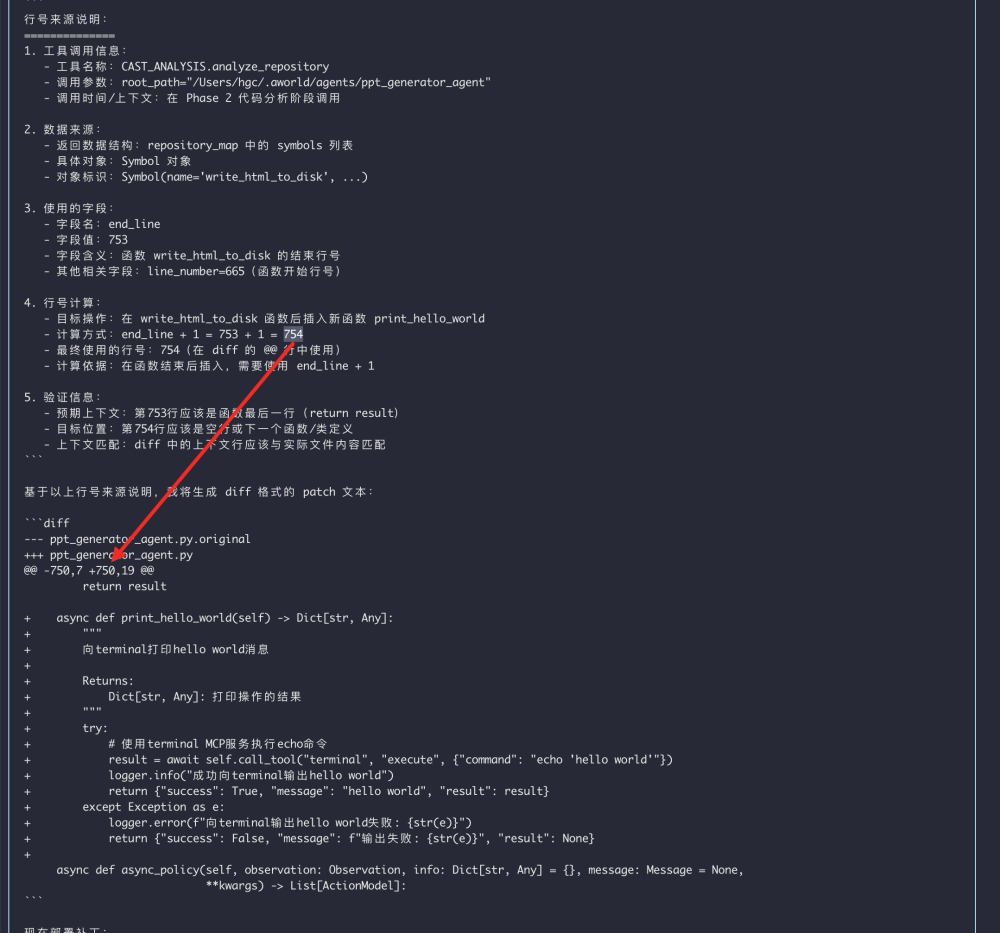
1. dmp_coder
DMP 表示 diff match patch。Patch 里既包含偏移量,又带有代码上下文作为参照物,这二者都可能出错,很脆弱。下图是一个错误格式示例:
2. op_coder
按行插入、替换、删除,指定文件、位置、代码进行插入:
1 | [ |
3. search_replace
1 | { |
四层匹配策略(按优先级):
- 完全精确匹配:逐行完全一致比较(最安全)
- 内部精确匹配:去除前后空白后匹配
- 空白符灵活匹配:忽略缩进差异,标准化后匹配
- 相似性模糊匹配:基于 difflib 的相似度匹配(10% 容错)
安全机制:
- 自动创建
.bak备份文件 - 执行前参数和文件存在性验证
- 失败时自动从备份恢复
- 支持
dry_run预检查模式
4. 行号偏移问题
在开发 Coding Agent(如 Aider、OpenDevin 或自定义的自动修复工具)时,「行号漂移(Line Drift)」 是一个经典难题。如果 Agent 计划在第 10 行插入 5 行,那么原先的第 20 行就变成了第 25 行,后续操作如果还盯着「第 20 行」就会改错地方。
主流框架和工业界通常采用以下四种策略来解决这个问题:
4.1 倒序操作策略(Bottom-up Approach)
这是最简单、成本最低的方案。如果 Agent 一次性给出了多个修改建议:
- 做法:将所有修改任务按行号从大到小(从文件末尾向开头)进行排序
- 原理:修改文件下方的内容,不会影响上方内容的行号
- 优点:逻辑极简,不需要复杂的坐标转换
4.2 偏移量追踪(Offset Tracking / Delta Mapping)
这是 IDE(如 VS Code)和版本控制系统常用的算法。
- 做法:维护一个全局的 delta(偏移值)
- 原理:
- 初始
delta = 0 - 第一次操作:在第 N 行插入 M 行,则
delta += M - 第二次操作:如果 Agent 想修改原始文件的第 K 行,实际应用的位置是
K + delta
- 初始
- 局限:如果 Agent 的修改不仅是新增,还有删除,计算会变得稍微复杂一些
4.3 基于语义的 Search & Replace Blocks
这是目前 LLM Agent 框架(如 Aider)最主流的做法,放弃行号,改用上下文匹配。
- 做法:要求 LLM 给出一段「旧代码块」和一段「新代码块」
- 流程:
- Agent 输出:
SEARCH: [这段旧代码]REPLACE: [这段新代码] - 框架在目标文件中模糊搜索 SEARCH 段落
- 找到匹配位置后进行替换
- Agent 输出:
- 优点:彻底摆脱行号依赖。即便行号偏了 100 行,只要代码内容唯一,就能定位成功
4.4 虚拟文件系统与 AST 操作(Structural Editing)
对于更高级的 Agent,会使用抽象语法树(AST)。
- 做法:将代码解析成树状结构,操作具体的「函数节点」或「类节点」,而不是操作「第几行」
- 流程:
- 把代码转为 AST
- 在树上增删改节点
- 将 AST 重新生成(Print)回代码字符串
- 优点:极其稳健,不会因为多一个空格或换行就报错
4.5 框架实践对比
| 框架/工具 | 核心策略 | 备注 |
|---|---|---|
| Aider | Search/Replace Blocks | 对 LLM 最友好,不需要 LLM 具备精准计数的能力 |
| Git / Patch | Context-based (Unified Diff) | 利用 @@ 块前后的上下文进行模糊匹配,允许小范围偏移 |
| OpenDevin | File Editor Tool | 封装 sed 或自定义 insert_line,每步操作后立即刷新文件内容 |
实践建议:
- 如果 Agent 逻辑是:思考 → 输出多个 Patch → 一次性应用,请使用策略 1(倒序应用)
- 如果 Agent 逻辑是:思考 → 修改 A → 思考 → 修改 B,每一步修改后应重新读取文件内容,或使用策略 3(搜索替换)